
iPhone 12 & above to get JioTrue5G support from Today
December 15, 2022
Mumbai: All iPhone 12 & above Jio users to get Jio Welcome Offer with TRULY UNLIMITED 5G DATA AT NO EXTRA COST
List of Apple devices with Jio True 5G support:
| Sr | Model |
| 1 | iPhone 12 Mini |
| 2 | iPhone 12 |
| 3 | iPhone 12 Pro |
| 4 | iPhone 12 Pro Max |
| 5 | iPhone 13 Mini |
| 6 | iPhone 13 |
| 7 | iPhone 13 Pro |
| 8 | iPhone 13 Pro Max |
| 9 | iPhone SE 2022 (3rd gen) |
| 10 | iPhone 14 |
| 11 | iPhone 14 Plus |
| 12 | iPhone 14 Pro |
| 13 | iPhone 14 Pro Max |
How to setup your iPhone for Jio True 5G:
In order to use a Jio 5G connection on your iPhone 12 model or later, you will need to update to the latest iPhone iOS and carrier settings:
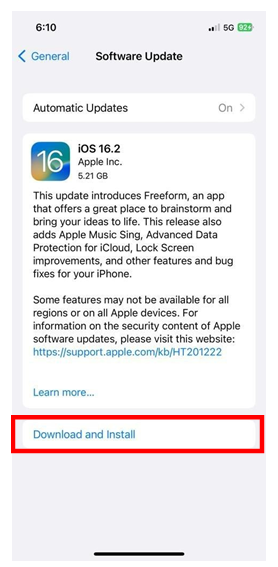
- On your iPhone, go to Settings > General > Software Update and update to the latest iOS version.

- Next, go to Settings > General > About and if prompted follow the steps to update to the latest carrier

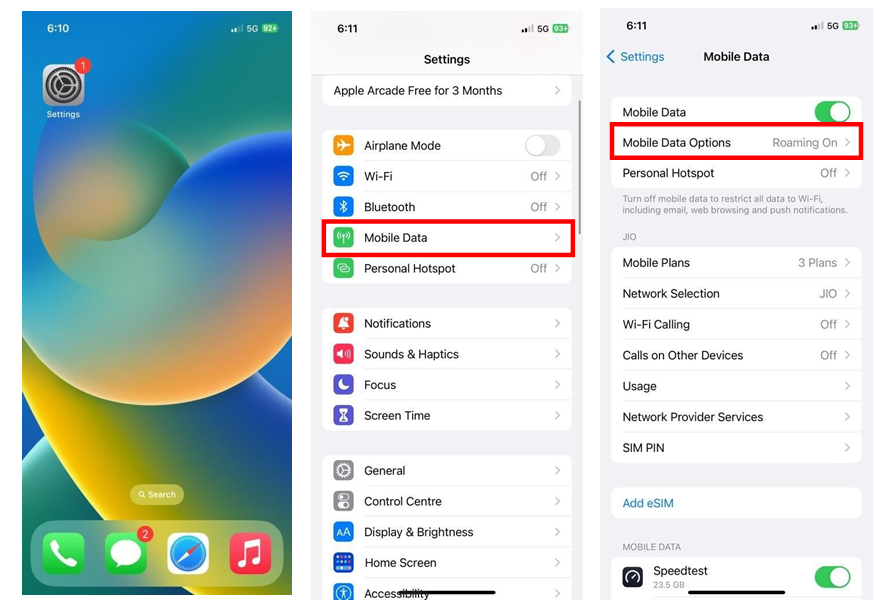
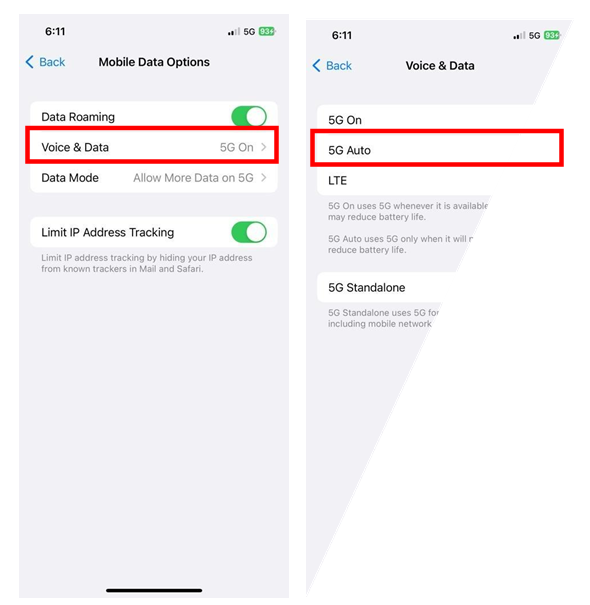
- To use a Jio 5G connection, go to Settings > Mobile Data > Voice & Data > and select 5G AUTO as well as 5G Standalone ON
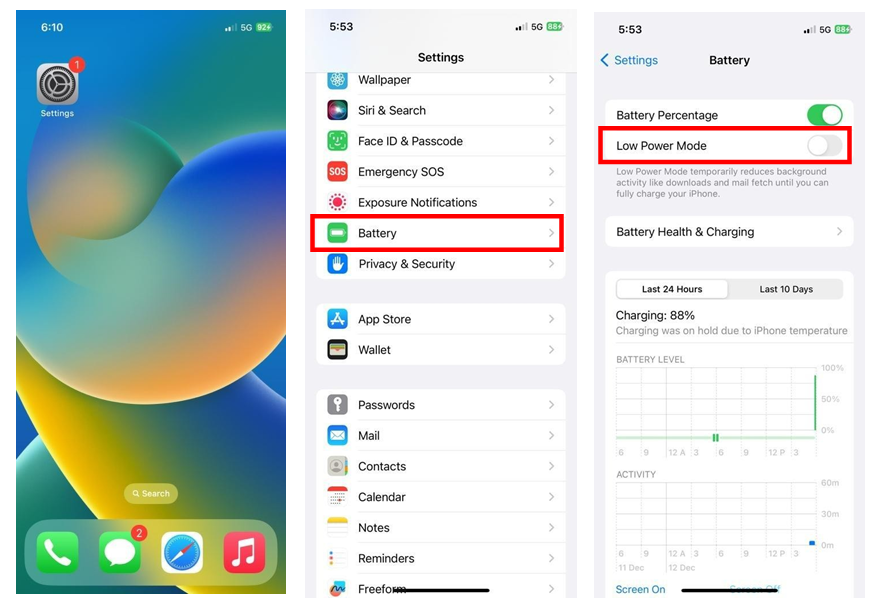
- Then go to Settings > Battery > Turn OFF Low Power Mode
Frequently asked questions about Jio True 5G on Apple iPhone
1. How do I use Jio True 5G on my Apple iPhone?
Apple iPhone 12 and newer models (14/13/12/SE 2022) support Jio True 5G. Your iPhone will require
a software upgrade, which will directly get pushed to your device from Apple. Please ensure, you
install iOS 16.2 or later update to make your phone 5G-ready.
2. I am able to see the 5G unlimited data pack on my number but why am I not able to use 5G on my
iPhone?
We have provided the Jio Welcome Offer on your number to enable unlimited 5G usage. To start using
Jio True 5G, kindly follow below steps:
1. Update device software to iOS 16.2 or later (Settings > General > Software Update)
2. Turn on 5G from Settings (Settings > Mobile Data > Voice & Data > and select 5G Auto)
3. Turn on 5G Standalone (Settings > Mobile Data > Voice & Data > and turn on 5G Standalone)
3. I’m currently using iOS 16.2 Beta software; how do I update to iOS 16.2 public software?
You need to visit Apple’s Beta Software Program website and follow the steps mentioned on
https://beta.apple.com/sp/betaprogram/unenroll#iosto unenroll your device. Following this, you can
update to iOS 16.2 or later version from Settings > General > Software Update
4. I have updated the software on my device to iOS 16.2 (or later). What do I need to do to get Jio True
5G Welcome Offer?
Jio Welcome Offer will be provided to you automatically as soon as your location has Jio True 5G. We
will communicate to you once you have been provided the Jio Welcome Offer.
5. I turned on 5G Standalone and got the message “5G Standalone may affect battery life and
reliability of Voice and Data Connection,” What should I do?
You can select 5G Auto mode (Settings > Mobile Data > Voice & Data > and select 5G Auto) and your
phone will automatically adjust to ensure that there is no adverse impact on device performance.
Keep 5G Standalone turned on to ensure your phone is 5G ready
Recent Stories
- Diwali Food Safety Drive: AMC Seals Two Units, Fines Four Outlets ₹40,000
- HDFC Bank Gets Govt Nod to Offer Deposits Under Capital Gains Accounts Scheme
- GSSSB Announces Recruitment for 1,237 Class-3 Posts; Applications Open on November 5
- AMC to Hike Parking Fees; Proposed New Rates Here
- Mumbai Mayor Ritu Tawde Meets Gujarat CM Bhupendra Patel
- Holiday Inn Resort to Come Up in Sasan Gir